

Azure Data Explorer (ADX) – Microsoft’s fast service for data exploration. It’s designed to handle massive volumes of data such as telemetry, logs, and time series data, which are commonly generated by applications and IoT devices. In this post, I will break down how ADX works, using a UML Components Diagram to illustrate its elements and its relationships.
The Big Picture of Azure Data Explorer
At its core, ADX is about efficiency and speed. It achieves this through a sophisticated architecture that separates data storage from data processing, allowing for flexible resource management and swift data queries. Here’s a simplified view of how data moves and is managed within ADX, as shown in the following UML Components Diagram.
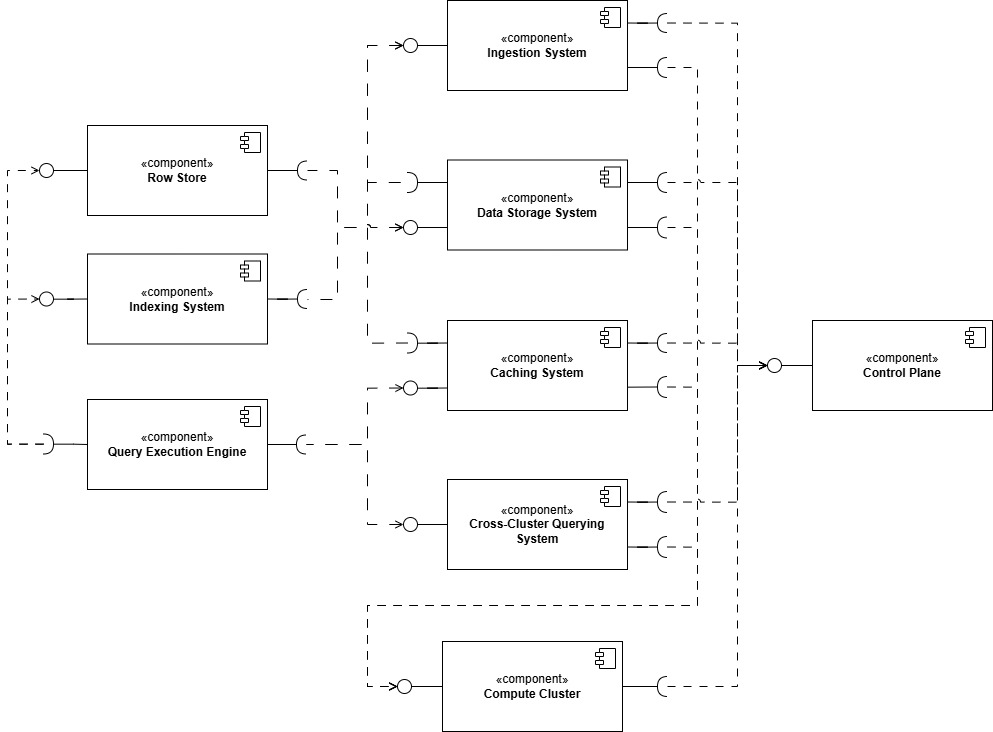
Key Components of Azure Data Explorer
Ingestion System
What it does: This is where data enters ADX. The Ingestion System takes in data from various sources and begins the process of organizing it for quick access.
Why it matters: Fast ingestion allows ADX to handle streams of data in real-time, making it ideal for applications that rely on immediate data processing.
Data Storage System
What it does: Once ingested, data is stored in what’s called an “extent,” which are effectively data shards that allow ADX to manage and retrieve data efficiently.
Why it matters: By organizing data into extents, ADX can scale its storage needs horizontally across many servers and optimize query speeds.
Row Store & Indexing System
What it does: The Row Store is a temporary storage area for small batches of fresh data, ensuring it is quickly available for querying. Simultaneously, the Indexing System creates indexes for this data, which helps in speeding up data retrieval.
Why it matters: These components are crucial for real-time analytics, enabling ADX to provide immediate insights from just-received data.
Query Execution Engine
What it does: This is the brain of the operation. The Query Execution Engine processes your data queries by pulling relevant data from storage and running computations.
Why it matters: The efficiency of this engine directly impacts how quickly you can gain insights from your data.
Caching System
What it does: Frequently accessed data is stored temporarily in a cache that’s closer to the processing engine to improve response times for common queries.
Why it matters: Caching is a key factor in achieving the high performance that ADX is known for, especially with repeated query scenarios.
Compute Cluster
What it does: This component handles the actual computation tasks for queries, working in tandem with the Query Execution Engine.
Why it matters: Compute clusters can be scaled depending on the load, ensuring that ADX can handle both small and large query volumes efficiently.
Control Plane
What it does: It manages and coordinates all other ADX components, overseeing tasks like resource allocation, scaling, and maintenance.
Why it matters: The Control Plane ensures that the ADX environment runs smoothly and efficiently, adapting to varying workloads and maintaining system health.
Query Flow in Azure Data Explorer
Step 1: Query Submission
Component Involved: Query Execution Engine
Description: The process begins when a user submits a query to the ADX service. The Query Execution Engine receives this query and initiates the execution process. This engine is the central hub for interpreting and directing how the query will be processed across the system.
Step 2: Query Planning
Component Involved: Query Execution Engine
Description: Once the query is received, the Query Execution Engine analyzes it to determine the most efficient way to retrieve and compute the data. This involves choosing which indexes and data segments (extents) to access, how to distribute the query across the system, and what computations are necessary to fulfill the query requirements.
Step 3: Data Retrieval
Components Involved: Data Storage System, Row Store, Indexing System
Description:
Data Storage System: This component stores the bulk of the data in compressed, columnar format. Depending on the query’s requirements, data may be fetched from here if it involves historical or extensive data sets.
Row Store: For queries that need access to real-time or very recent data, the Row Store component provides quick access to this temporarily stored data before it is moved to the main storage system.
Indexing System: This system plays a crucial role by allowing quick access to the needed data without scanning entire datasets. It uses indexes to locate data efficiently, significantly speeding up the query process.
Step 4: Data Processing
Components Involved: Compute Cluster, Caching System
Description:
Compute Cluster: This cluster performs the actual computations required by the query. It processes the data retrieved by the storage systems, executing aggregations, joins, and other operations specified in the query.
Caching System: If the query involves data that has been recently accessed or frequently queried, the Caching System may supply this data directly from its high-speed cache, reducing access time and improving query performance.
Step 5: Aggregation and Final Computation
Component Involved: Query Execution Engine
Description: After the Compute Cluster has processed the data, the results are sent back to the Query Execution Engine. Here, any final aggregations, sorting, or computations are performed. This step ensures that the query results are prepared exactly as specified in the query.
Step 6: Result Delivery
Component Involved: Query Execution Engine
Description: The final step in the query process is the delivery of results to the user. The Query Execution Engine compiles the results into the requested format and sends them back to the user interface or application that initiated the query.
Ingestion Flow in Azure Data Explorer
Step 1: Data Entry
Component Involved: Ingestion System
Description: The ingestion process starts when data is sent to Azure Data Explorer. The Ingestion System is the entry point for all data coming into ADX. It handles the initial reception of data streams or batch data from various sources like logs, telemetry, events, or time series data.
Step 2: Data Buffering and Initial Management
Component Involved: Row Store
Description: Upon receiving the data, the Ingestion System temporarily stores it in the Row Store. This component is crucial for handling small to medium-sized data quickly and efficiently. The Row Store acts as a buffer and enables immediate access to the newly ingested data for querying, even before it’s transferred to more permanent storage.
Step 3: Indexing
Component Involved: Indexing System
Description: Simultaneously with buffering, the Indexing System begins creating indexes for the ingested data. Indexing is essential for optimizing data retrieval and query performance. It allows ADX to maintain high speeds by indexing key attributes of the data, such as timestamps, unique identifiers, or specific fields relevant to typical queries.
Step 4: Data Compression and Encoding
Component Involved: Data Storage System
Description: After initial handling, the data is moved from the Row Store to the Data Storage System for long-term storage. Here, the data undergoes compression and encoding to minimize storage space and optimize query performance. The Data Storage System organizes the data into extents, which are compressed and stored in a columnar format.
Step 5: Data Caching
Component Involved: Caching System
Description: As the data is stored, the Caching System may cache frequently accessed data or data that is expected to be queried soon. This system uses a multi-hierarchy cache strategy, ensuring that hot data is kept close to the compute resources, thus enhancing the speed and responsiveness of data queries.
Step 6: Data Availability for Querying
Component Involved: Query Execution Engine
Description: Once the data is indexed, compressed, and stored in the Data Storage System, it becomes fully available for querying. The Query Execution Engine can now access and execute queries on this data, pulling from both the Row Store for real-time data and the Data Storage System for historical data.
Conclusion
In summary, Azure Data Explorer (ADX) is engineered to manage the complexities associated with large-scale data analytics, offering a streamlined approach to both data ingestion and query processing. The system’s architecture delineates clear roles for each component, facilitating an efficient flow from data entry to retrieval. During ingestion, data passes through several stages—receipt, buffering, indexing, and storage—each optimized to prepare data for rapid access and analysis. This meticulous organization not only accommodates the swift handling of massive volumes of data but also enhances the system’s scalability.
On the querying side, ADX leverages its sophisticated Query Execution Engine to handle and execute complex queries efficiently. This engine optimizes data retrieval by intelligently accessing indexed and cached data, which significantly reduces query latency and improves overall system performance. The interaction between the Query Execution Engine, the Compute Cluster, and the storage systems underpins the capability of ADX to deliver high-performance querying, enabling the extraction of actionable insights from large datasets in real-time.
This structure supports the delivery of real-time insights and robust analytics, applicable across various industries. However, potential users should consider the complexities involved in managing such an integrated system, including the need for adequate scaling and maintenance of the individual components to ensure optimal performance. This objective understanding of ADX highlights its capabilities while acknowledging the considerations necessary for its effective deployment and use.
References
Microsoft. (n.d.). How Azure Data Explorer works. Retrieved October 27, 2024, from https://learn.microsoft.com/en-us/azure/data-explorer/how-it-works

 Systems, Architecture and Systems Architecture
Leave a comment